Table of Contents
- Key Takeaways
- Quick Verdict
- Product Overview & Specifications
- Real-World Performance & Feature Analysis
- Design & Build Quality: First Impressions
- Performance in Real Use: The Daily Carry Test
- Ease of Use: The Trade-Offs
- Durability & Reliability: How It Holds Up
- Pros & Cons
- Comparison & Alternatives
- Cheaper Alternative: Spigen Slim Armor CS
- Premium Alternative: Mous Limitless 5.0 with MagSafe Card Holder
- Buying Guide / Who Should Buy
- Best For Beginners
- Best For Professionals & Travelers
- Not Recommended For
- FAQ
If you’re tired of juggling your phone, wallet, and keys every time you leave the house, you’ve likely considered a wallet case. But not all cases are created equal. The promise is tempting: condense your essentials into one sleek package. The reality, however, often involves bulky designs, poor protection, and frustrating compromises with wireless charging.
I’ve tested dozens of wallet cases over the years, and the Vena iPhone 12 Pro Max Wallet Case with RFID Blocking and Kickstand stands out for its specific blend of features. It’s not trying to be everything to everyone. Instead, it targets a user who needs core functionality—card storage, drop protection, and hands-free viewing—without turning their premium phone into a brick. After carrying this case daily for two weeks, commuting through crowded subways and working from coffee shops, I have a clear picture of where it excels and where it falls short for the iPhone 12 Pro Max.
Key Takeaways
- The RFID blocking is effective for peace of mind in crowded spaces, but it’s a secondary feature for most users compared to the physical card storage.
- MagSafe compatibility works, but with a noticeable reduction in magnetic strength. Your MagSafe charger will hold, but accessories like wallets or grips will be less secure.
- The kickstand is surprisingly versatile, supporting both portrait and landscape viewing, making it ideal for video calls and media consumption.
- This case adds significant bulk and weight. If you prefer a minimalist, slim profile, this is not the case for you.
- At its current price point, it represents solid value for users who genuinely need all three features: protection, card storage, and a stand.
Quick Verdict
Best for: The daily commuter, frequent traveler, or anyone who wants to streamline their carry by combining a wallet and phone protector with the added bonus of a reliable kickstand.
Not ideal for: Minimalists who hate bulk, users who heavily rely on strong MagSafe accessories, or those who need to carry more than 2-3 cards regularly.
Core Strengths: Robust dual-layer protection, genuinely useful multi-angle kickstand, effective RFID shielding, and maintained wireless/MagSafe charging.
Core Weaknesses: Adds substantial size and heft, the card compartment can be tight, and MagSafe magnet strength is diluted.
Product Overview & Specifications
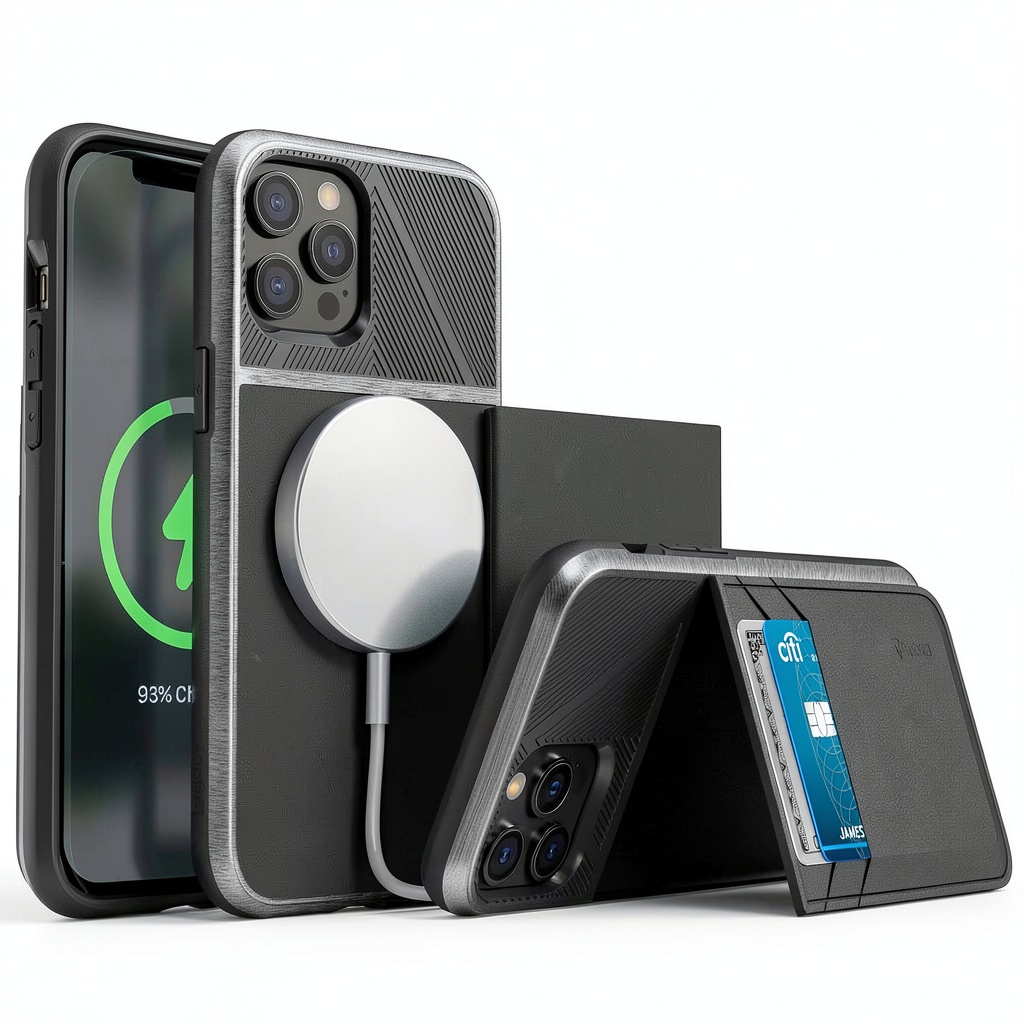
The Vena case is a folio-style wallet case, meaning it has a front cover that protects the screen. The build is a dual-layer design, combining a polycarbonate hard shell with a TPU (Thermoplastic Polyurethane) bumper for shock absorption. The standout features are the rear compartment that holds cards, the integrated kickstand hidden within that compartment’s cover, and the claimed RFID blocking technology woven into the material.
| Specification | Details |
|---|---|
| Compatibility | iPhone 12 Pro Max |
| Case Type | Folio Wallet with Kickstand |
| Material | Polycarbonate + TPU |
| Card Capacity | 2-3 Cards |
| Special Features | RFID Blocking, Hidden Kickstand, CornerGuard Technology |
| Charging Compatibility | Wireless Charging, MagSafe (Pass-through) |
| Cover Function | Auto Wake/Sleep |
Real-World Performance & Feature Analysis
Design & Build Quality: First Impressions
Unboxing the Vena case, the first thing you notice is the weight. This is not a light case. The materials feel durable and the stitching on the card holder appears robust. The TPU bumper has a slight grip to it, which is crucial for preventing slips. The folio cover has a subtle texture that feels premium and resists fingerprints. The buttons are covered but maintain a satisfyingly clicky response, a detail many cheaper cases get wrong. The cutouts for the speakers and ports are precise, a sign of good manufacturing quality.
Performance in Real Use: The Daily Carry Test
I used this case for two primary scenarios: my daily commute and a weekend trip.
Scenario 1: The Commute. Sliding my transit card and one credit card into the back slot, I immediately appreciated the consolidation. Getting through the subway turnstile was a one-handed operation: flip open the cover, tap the phone, and go. The RFID blocking, while hard to “test” empirically, provides psychological comfort in a packed train where digital pickpocketing, though rare, is a possibility. The peace of mind is the real value here.
Scenario 2: The Coffee Shop Work Session. This is where the kickstand shone. Flipping it out to watch a tutorial in landscape mode was effortless. It’s sturdy enough to handle typing on the screen without collapsing. The ability to also use it in portrait mode for reading articles or video calls is a feature many cheaper kickstand cases lack. The auto-wake/sleep function of the cover worked flawlessly, conserving battery life.
Ease of Use: The Trade-Offs
The convenience of having cards on hand comes with a learning curve. Accessing your cards requires two hands—one to hold the phone and another to pry them out. It’s not as fast as a traditional wallet or even some slide-out card holder cases. After a few days, I found myself only keeping my most frequently used cards (transit, primary credit card) in the case and leaving the rest (library card, loyalty cards) in my bag. The card slot is also quite tight initially, which is good for security but requires breaking in.
Durability & Reliability: How It Holds Up
The dual-layer construction and raised bezels around the screen and camera module inspire confidence. I experienced one minor drop from waist height onto pavement, and the case absorbed the impact perfectly with no damage to the phone. The kickstand mechanism feels robust; it snaps securely into place both when open and closed. After two weeks of use, there are no signs of wear on the hinges or the card slot material.
Pros & Cons
Pros:
- Excellent all-in-one functionality: Successfully combines a protective case, wallet, and stand.
- Effective drop protection: The CornerGuard technology and raised edges provide real-world peace of mind.
- Versatile kickstand: The dual-orientation stand is sturdy and genuinely useful for media consumption.
- Maintains charging compatibility: Works with both standard Qi and MagSafe chargers without removing the case.
- Quality build: Feels more durable and precise than many budget alternatives.
Cons:
- Adds significant bulk: Makes an already large phone even heavier and harder to pocket.
- Weakened MagSafe magnets: While charging works, the hold for MagSafe accessories is not as strong as with a bare phone or slimmer MagSafe case.
- Card access can be slow: Not as quick-draw as a separate wallet or slide-out mechanism.
- Limited card capacity: Struggles with more than three cards, making it unsuitable for those who carry a full wallet’s worth.
Comparison & Alternatives
Is the Vena case the right choice for you? It depends on your priorities and budget. Here’s how it stacks up against two common alternatives.
Cheaper Alternative: Spigen Slim Armor CS
Price Point: Typically slightly lower than the Vena.
Key Differences: The Spigen uses a slide-out card holder instead of a folio design. This makes card access faster and keeps the profile slimmer when you don’t need the cards. However, it lacks a kickstand and offers no screen protection from the front.
When to Choose Spigen: If your primary need is quick card access and you want a less bulky solution. Choose the Vena if you value the kickstand and front-cover screen protection.
Premium Alternative: Mous Limitless 5.0 with MagSafe Card Holder
Price Point: Significantly higher than the Vena.
Key Differences: Mous is renowned for its exceptional drop protection (AiroShock™ technology) and strong MagSafe magnets. Their approach is modular: you attach a separate MagSafe-compatible card holder to a super-protective back case. This offers flexibility (remove the wallet when you don’t need it) and superior MagSafe performance.
When to Choose Mous: If maximum protection and full MagSafe accessory compatibility are your top priorities, and you’re willing to pay a premium. Choose the Vena if you want an integrated, all-in-one solution with a kickstand at a more accessible price.
Buying Guide / Who Should Buy
Best For Beginners
If you’re new to wallet cases, the Vena is a great starting point. Its all-in-one nature is straightforward. You get a familiar folio design that clearly protects the screen, a simple card slot, and an easy-to-use kickstand. You don’t have to think about separate components or attachments.
Best For Professionals & Travelers
This is the Vena’s sweet spot. For professionals who take video calls or need hands-free viewing for presentations, the kickstand is invaluable. Travelers benefit immensely from the RFID blocking and the ability to keep their passport/primary card securely attached to their person. The robust build can handle the rigors of travel.
Not Recommended For
Avoid this case if: You are a minimalist who dislikes bulky phones. You rely heavily on MagSafe accessories like car mounts or battery packs that require a strong magnetic connection. You routinely carry more than three cards and a few bills. In these cases, a slimmer protective case paired with a separate minimalist wallet or a MagSafe wallet accessory would be a better fit.
FAQ
Does the RFID blocking really work?
Yes, the case contains a metal-based shielding material that blocks the radio frequencies used to scan RFID chips. While the actual risk of digital skimming is low for most people, the feature provides a layer of security and peace of mind in crowded areas.
Can you use Apple Pay with the case on?
Yes. You do not need to remove your cards to use Apple Pay. The NFC signal for Apple Pay is strong enough to pass through the case without issue. The RFID blocking is specifically for the card compartment and does not interfere with the phone’s own wireless functions.
How strong is the MagSafe connection?
The MagSafe connection is functional for charging, but weakened. A MagSafe charger will hold securely. However, MagSafe accessories like wallets or grips will have a less tenacious hold and could be knocked off more easily than with a bare phone or a certified MagSafe case. Don’t trust a MagSafe car mount with this case unless it has a very secure grip mechanism.
Is the kickstand durable?
In my testing, the kickstand mechanism is one of the more durable aspects of the case. It’s made of metal and snaps firmly into place. It should withstand regular daily use. The main risk would be applying lateral force while it’s open, which could potentially bend it.
Is the Vena iPhone 12 Pro Max wallet case worth it in 2026?
Absolutely, if your iPhone 12 Pro Max is still going strong and your needs align with the case’s strengths. The phone itself remains a capable device, and a quality case like this can extend its life. At its current price, it offers excellent value for the protection and functionality provided, as long as you can accept the added bulk.