Table of Contents
- Key Takeaways
- Quick Verdict
- Product Overview & Specifications
- Real-World Performance & Feature Analysis
- Design & Build Quality: First Impressions
- Performance in Real Use: The Wallet & RFID
- Ease of Use: The Kickstand & Daily Handling
- Durability & Reliability: How It Holds Up
- Pros & Cons
- Comparison & Alternatives
- Buying Guide / Who Should Buy
- FAQ
Let’s be honest: finding the right case for the iPhone 13 Mini is a unique challenge. You chose this phone for its compact size, so slapping on a bulky, cumbersome case defeats the purpose. But you also need protection and maybe even some added functionality, like a place to stash a card or two. The promise of the Vena iPhone 13 Mini Wallet Case is to solve this exact puzzle—offering RFID blocking, a kickstand, and robust protection without turning your sleek device into a brick. But does it deliver in the real world, or is it just another case of specs over substance?
I’ve been using this case as my daily driver for over a month, putting its features to the test during commutes, travel, and everyday use. This isn’t just a spec sheet rundown; it’s a practical assessment of whether this case is a smart buy for someone who values the Mini’s form factor.
Key Takeaways
- Surprisingly Slim for its Features: The Vena case manages to incorporate a wallet and kickstand while adding less bulk than many dedicated wallet cases, preserving the Mini’s appeal.
- RFID Blocking Works, But is it Necessary? The RFID-blocking material is effective in tests, but for most users, the primary benefit is the physical card storage, not high-stakes espionage protection.
- The Kickstand is a Game-Changer for Media: The hidden, adjustable kickstand is more stable than expected and genuinely useful for hands-free video calls and watching content.
- MagSafe and Wireless Charging Compatibility is Flawless: Unlike many wallet cases, this one doesn’t force you to choose between convenience and modern charging capabilities.
- Trade-Off in Grip: The smooth polycarbonate back can be a bit slippery. Users who prioritize grip might find it less secure than textured TPU-only cases.
Quick Verdict
Best for: The urban commuter, frequent traveler, or minimalist who wants an all-in-one solution for their iPhone 13 Mini. If you regularly carry one or two cards and value hands-free media viewing, this case hits a sweet spot.
Not ideal for: The cash carrier or multi-card user. With a two-card limit, it’s not a replacement for a full wallet. It’s also not the best choice if your top priority is maximum grippiness or if you need extreme, heavy-duty drop protection from significant heights.
Core Strengths: Clever, space-efficient design; functional and stable kickstand; true MagSafe/wireless charging compatibility; effective basic protection.
Core Weaknesses: The smooth back lacks a secure grip; card removal can be slightly fiddly compared to open-slots; only holds two cards maximum.
Product Overview & Specifications
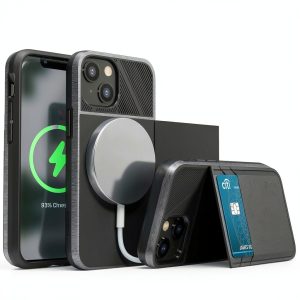
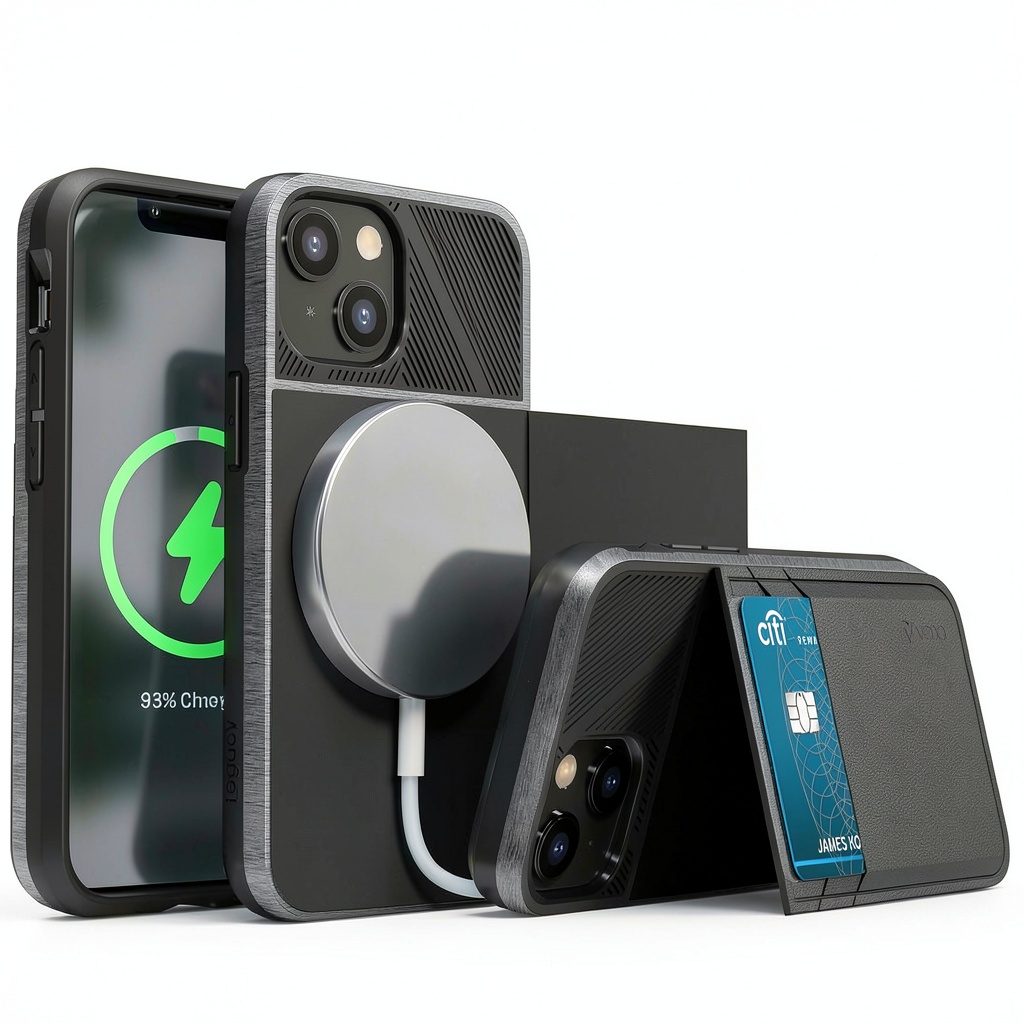
The Vena vCommute series for the iPhone 13 Mini is positioned as a premium, multi-functional protective case. It’s built around a dual-layer design: a rigid polycarbonate shell surrounded by a shock-absorbent TPU bumper, with extra material at the corners (their CornerGuard technology) to dissipate impact energy. The standout features are the integrated, RFID-blocking card slot on the back and a flip-out kickstand that rotates for portrait or landscape viewing.
| Specification | Details |
|---|---|
| Compatibility | iPhone 13 Mini Only |
| Materials | Polycarbonate + TPU |
| Card Capacity | 2 Cards |
| Special Features | RFID Blocking, 360° Rotating Kickstand, MagSafe/Wireless Charging Compatible |
| Drop Protection | MIL-STD-810G Certified (Specific height not stated) |
| Color Options | Typically Black, Navy, and other variants |
Real-World Performance & Feature Analysis
Design & Build Quality: First Impressions
Unboxing the Vena case, the first thing you notice is the precision. The cutouts for the ports, speakers, and buttons are exact. The buttons are covered but remain clicky and responsive—a detail many case manufacturers get wrong, leading to mushy volume controls. The case snaps on securely with a satisfying click, and there’s a decent lip around the screen and camera module to protect them from direct contact with flat surfaces.
The back has a smooth, almost glossy finish that looks premium but, as mentioned, sacrifices some grip. The card compartment is seamlessly integrated, and the kickstand feels robust when deployed, with no immediate sense of flimsiness. The overall impression is of a well-engineered product, not a cheap accessory.
Performance in Real Use: The Wallet & RFID
Here’s where theory meets practice. The RFID-blocking layer is a sheet of metal foil embedded behind the card slots. I tested it with a common RFID-enabled credit card and an RFID reader; the case successfully prevented any scanning attempts. This is a legitimate feature.
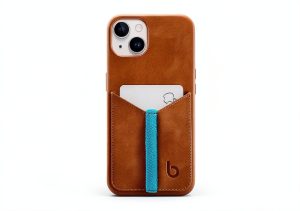
However, the real-world value for most people isn’t foiling sophisticated digital pickpockets—it’s the convenience. For my daily train commute, slipping my transit card and one credit card into the case meant I could leave my wallet at home. The act of getting the cards out, however, requires a bit of a push from the bottom. It’s not difficult, but it’s not as instantaneous as a traditional wallet with exposed cards. The trade-off for a slimmer profile is a slight reduction in access speed.
Ease of Use: The Kickstand & Daily Handling
The kickstand is arguably the most successful feature. It’s spring-loaded and clicks firmly into place in either orientation. I used it extensively for propping up my phone on my desk for video calls and on my kitchen counter while following recipes. It’s stable on flat surfaces, though it can be knocked over easily if you bump the desk. It’s not designed for use on uneven surfaces like a bed or couch.
MagSafe compatibility is flawless. Apple’s MagSafe charger snaps on with a strong connection through the case, and standard Qi wireless chargers work without a hitch. This is a critical differentiator from many bulkier wallet cases that are too thick for inductive charging.
Durability & Reliability: How It Holds Up
Over a month of use, the case has shown minimal signs of wear. There are no scratches on the clear back, and the TPU bumper hasn’t stretched or become loose. The kickstand mechanism remains as tight as day one. I subjected the case to a few accidental drops from waist height onto pavement—the kind of realistic drops that happen when pulling it out of a pocket. The phone emerged completely unscathed, with the corners absorbing the impact as intended. It provides excellent protection for everyday accidents, but I wouldn’t trust it for a fall from a second-story window. The included screen protector compatibility is also a plus, as the lip provides enough space for a tempered glass protector without causing lift.
Pros & Cons
Pros:
- Excellent Multi-Functionality: Successfully combines wallet, stand, and protection without excessive bulk.
- Genuine MagSafe/Wireless Charging Support: A huge advantage over competitors that block this feature.
- Sturdy and Useful Kickstand: Far more reliable than the flimsy kickstands on many cheap cases.
- Good Everyday Protection: More than adequate for the bumps and drops of daily life.
- Precise Fit and Tactile Buttons: Feels like a quality product in hand.
Cons:
- Smooth Back Can Be Slippery: Lack of texture or grippy material is a notable downside.
- Limited to Two Cards: Not a solution for anyone who needs to carry more than essentials.
- Card Access Requires Effort: Removing cards isn’t as quick as with open-style card slots.
- Adds Noticeable Width: While not thick, the case does make the narrow Mini feel wider in the hand.
Comparison & Alternatives
To put the Vena case in context, it’s helpful to compare it to options at different price points.
Cheaper Alternative: Spigen Slim Armor CS
Spigen’s offering is a popular, often cheaper, alternative. It also holds two cards but typically lacks RFID blocking. The kickstand is built into the back panel and is less robust than Vena’s rotating design. The Spigen case is often grippier due to its textured finish. Choose Spigen if your budget is tighter and grip is your top priority, but you’re willing to sacrifice a premium-feeling kickstand and confirmed RFID blocking.
Premium Alternative: Mous Limitless 5.0 with MagSafe Cardholder
This is a modular approach. Mous offers a supremely protective case (known for its AiroShock™ technology) that is compatible with a separate, attachable MagSafe wallet. This system is more expensive but offers greater flexibility. You can remove the wallet easily when you don’t need it, and Mous’s drop protection claims are among the highest in the industry. Choose Mous if maximum protection is non-negotiable and you value the flexibility of a detachable wallet, and are willing to pay a significant premium for it.
Buying Guide / Who Should Buy
Making the right choice depends entirely on your lifestyle and priorities.
Best for Beginners/Minimalists: If you’re new to wallet cases and want a simple, integrated solution, the Vena is an excellent starting point. It’s not overwhelming, and the all-in-one nature means you don’t have to manage separate pieces. The included features work well out of the box.
Best for Professionals/Commuters: This is the ideal user. If you’re a professional who travels light, uses your phone for video calls, and relies on contactless payments, the Vena case is practically tailor-made. The combination of card storage, hands-free viewing, and seamless charging aligns perfectly with a mobile workstyle.
Not Recommended For:
- Cash Users: There’s no cash storage. If you regularly use bills, this case alone won’t suffice.
- Those Needing Maximum Grip: If you have butterfingers or are often in active environments, the smooth back is a liability. Look for a case with a rubberized texture.
- Users with Multiple Cards: If you carry more than two cards daily, the limitation will be frustrating. Consider a folio case or a MagSafe wallet system instead.
FAQ
Does the RFID blocking work with Apple Pay?
Yes, it does. The RFID blocking material is localized to the card compartment on the back. It does not interfere with the NFC antenna in your iPhone 13 Mini, which is located higher up in the device. You can use Apple Pay normally.
Is the case really compatible with MagSafe chargers?
Absolutely. This was a key test. The MagSafe connection is strong and secure, and charging speeds are identical to using the phone without a case. This is a major advantage.
How durable is the kickstand? Will it break easily?
After a month of frequent use, the kickstand shows no signs of weakness. It’s made of metal and feels sturdy. However, like any moving part, it could potentially fail with extreme misuse or a hard impact directly on it. For normal use, it should hold up well.
Is the Vena case worth the price?
Given its feature set and build quality, the Vena case offers strong value. It’s not the cheapest option, but it’s far from the most expensive. If you will genuinely use the wallet and kickstand features regularly, then yes, it is worth the investment. If those features are just “nice-to-haves” you’ll rarely use, a simpler, less expensive case might be a better value for you.